LuckyWins payment methods in Australia
 Available in AU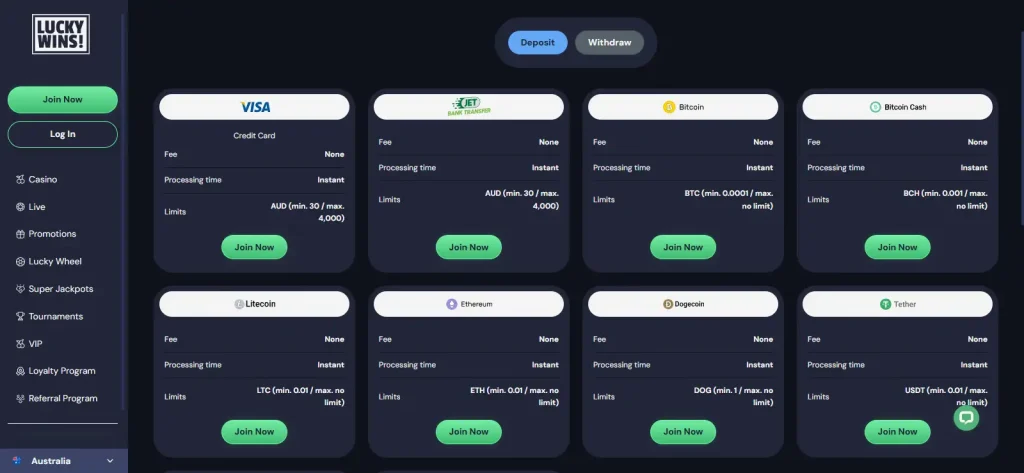
Table of Contents
- AUD is a supported LuckyWins account and payment currency
- What types of payment rail LuckyWins supports
- The current payments page shows method-specific deposit ranges
- Do not turn a deposit row into a withdrawal claim
- A simple cashier sequence for Australian users
- Why PayID should not be assumed at LuckyWins
- AUD support helps, but conversion can still happen outside LuckyWins
- LuckyWins banking questions for Australia
- Where to check current LuckyWins payment limits
- How LuckyWins banking works for AUD users
Section element
LuckyWins supports AUD and publishes multiple cashier rows for Australian-dollar deposits. The current official payments page shows card deposits with an AUD 30 minimum and AUD 4,000 maximum, while several additional cashier rows also display AUD limits. Exact method availability is account- and region-sensitive, so the practical check is to open the cashier, select AUD, confirm the method name, deposit limit and whether the same rail is available for withdrawal.
The payment mix includes cards, e-wallets, bank or online-transfer rails and cryptocurrency. Do not assume that every category or every deposit method is available to every Australian account. In particular, PayID is a common Australian search topic, but PayID is not listed on the current public LuckyWins payments page.
AUD is a supported LuckyWins account and payment currency
LuckyWins lists AUD among its supported currencies and exposes Australian-dollar values on multiple rows of the official payments page. That is useful for Australian users because it reduces the need to read euro or US-dollar limits and then estimate a conversion yourself.
Currency support does not mean every payment rail is denominated in AUD or that a card issuer, wallet or bank will avoid conversion charges. The relevant question is what the cashier displays for your selected method at the time of the transaction. If your bank account or wallet uses another settlement currency, any conversion is controlled by the payment provider rather than by the headline LuckyWins AUD limit.
For a first deposit, start with the cashier rather than a third-party method list. Payment menus change more quickly than general site features, and method names can be hidden behind logos or account-specific availability.
What types of payment rail LuckyWins supports
Cards
Credit card deposits are explicitly named on the current payments page. The AUD row shows a deposit range rather than a withdrawal promise.
E-wallets
E-wallets are part of the available payment mix, but the exact wallets shown to an Australian account should be confirmed in the cashier.
Bank and online transfer
Bank or online-transfer rails form part of the payment mix. Availability can vary by region and account.
Cryptocurrency
LuckyWins supports crypto payment categories alongside fiat currencies. Crypto amounts should not be converted into an AUD promise unless the cashier shows that conversion.
The current payments page shows method-specific deposit ranges
Method limits are not uniform. In the current public table, the named Credit Card row shows AUD 30 to AUD 4,000. Other rows on the same page expose different AUD ranges, including AUD 30 to AUD 6,000, AUD 20 to AUD 6,000, AUD 30 to AUD 750, AUD 20 to AUD 1,000, AUD 30 to AUD 4,000 and AUD 25 to AUD 400. Because several method labels are represented as images in the public page output, assigning those limits to a payment brand without seeing the cashier logo would be guesswork.
That variation is the reason to avoid a single site-wide statement such as “LuckyWins deposits start at AUD 20”. The minimum depends on the chosen rail. If a bonus also has a qualifying deposit threshold, you need to satisfy both the payment-method minimum and the promotion minimum.
| Check | What the current page shows | How to use it |
|---|---|---|
| Currency | AUD appears across multiple payment rows | Select AUD before comparing methods |
| Named card row | AUD 30 minimum / AUD 4,000 maximum | Use as a deposit limit only, not a withdrawal limit |
| Fees on surfaced deposit rows | “None” is displayed | Your bank or wallet may still have its own charges |
| Processing on surfaced deposit rows | “Instant” is displayed | This describes deposit processing, not withdrawal speed |
| PayID | PayID not listed on the public payments page | Do not assume it is available because it is common in Australia |
Do not turn a deposit row into a withdrawal claim
The LuckyWins payments interface separates Deposit and Withdraw views. That matters because a rail that accepts an instant deposit may not be the rail used for cash-out, and the limits shown in a deposit table cannot safely be copied into a withdrawal guide.
For withdrawal mechanics, use the dedicated withdrawal rules. A cash-out can also interact with account checks, so it is worth understanding verification before withdrawal before you choose a funding method.
A practical rule is to favour a deposit route only after checking how LuckyWins expects withdrawals to be returned. If the cashier requires another method for withdrawal, that can add setup or verification steps later.
Payment-method comparison
- Is the method visible after you log in from Australia?
- Does it accept AUD directly?
- What are the live minimum and maximum deposit amounts?
- Can the method also receive withdrawals, or will another rail be required?
A simple cashier sequence for Australian users
- Confirm the account currency. Make sure AUD is selected before comparing limits or a promotion threshold.
- Read the actual method name. Do not rely on a generic logo list from a review written for another country.
- Check the deposit range. Method-specific limits vary materially across the current LuckyWins table.
- Check fees on both sides. LuckyWins may show no fee while a bank, card issuer, wallet or blockchain network applies its own charge.
- Check withdrawal compatibility. Open the Withdraw view rather than assuming the deposit rail works in reverse.
- Check account verification. Payment ownership and identity checks can become relevant before a withdrawal is processed.
- Only then check the bonus. If you are depositing for a promotion, confirm that the chosen method and amount qualify under the current LuckyWins bonus terms.
Why PayID should not be assumed at LuckyWins
PayID is prominent in Australian payments generally and appears frequently in casino-related search behaviour. That makes it an obvious thing for an Australian reader to look for. That does not mean LuckyWins supports PayID.
PayID is not listed on the current public LuckyWins payments page. A third-party article or a general statement about Australian casino banking does not establish PayID as a LuckyWins method. If PayID appears inside your logged-in cashier, use the limits shown there; if it does not, choose among the methods actually displayed to your account.
AUD support helps, but conversion can still happen outside LuckyWins
If both your LuckyWins account and your funding source are in AUD, you can compare a cashier limit directly in Australian dollars. If the underlying card, wallet or crypto asset settles in another currency, conversion may occur before or after the casino transaction. Exchange rates and conversion fees depend on the payment provider and should be checked with that provider.
This is especially relevant when a promotion is expressed in multiple currency equivalents. Use the AUD amount published for the promotion rather than converting a euro headline yourself. The same principle applies to deposits: use the current AUD row for your selected payment method.
LuckyWins banking questions for Australia
Does LuckyWins accept AUD?
Yes. AUD is a supported currency and appears on multiple rows of the current official payments page.
What is the minimum LuckyWins deposit in AUD?
There is no single minimum that safely applies to every method. The named Credit Card row currently starts at AUD 30, while other published AUD rows use different minimums. Check the method you actually select.
Does LuckyWins support PayID?
PayID is not listed on the current public LuckyWins payments page. Do not treat it as available unless it appears in your live cashier.
Are LuckyWins deposits instant?
The surfaced rows on the current public deposit table show instant processing, including the named card row. That does not imply instant withdrawals.
Can I use the deposit maximum as a withdrawal maximum?
No. Deposit and withdrawal limits are separate. Use the Withdraw view and the dedicated withdrawal guide for cash-out limits and processing rules.
Where to check current LuckyWins payment limits
The official LuckyWins Payments page lists AUD payment rows and deposit limits, while the logged-in cashier is the best place to confirm the methods and limits currently available to your account. For registration, see account setup; for Australian regulatory context, see licence status; and for common practical questions, see the payments FAQ.
How LuckyWins banking works for AUD users
LuckyWins provides genuine AUD support and a broad mix of payment categories, but the limits belong to individual rails rather than to the site as a whole. The strongest approach is to select AUD, inspect the exact live method, confirm its deposit range and then check the Withdraw view before funding the account. That avoids two common mistakes: assuming a popular Australian method such as PayID is available, and treating an instant deposit limit as a promise about withdrawals.
For the broader brand overview, see the LuckyWins review.